Recent Posts

Showing posts with label Adding Incident in SCSM. Show all posts

Thursday, 10 October 2013

Adding new Incident Category in SCSM - In Depth

Well !! In this Post we will talk about adding new Incident Category in SCSM  . It May be noted that Incident Management / Category is a default Category in SCSM and Cannot be Deleted . In this exercise we will see step by step as to how to create a new Incident category in SCSM .

Log into the server as Administrator :

Go to Service Manager > Library > Lists > Incident Classification :

System Center Service Manager Incident Category 1

Double Click the Incident Classification Link .

System Center Service Manager Incident Category 2


After that , Click on add Item and add a new Item As Operating System Issue . After that Add new Child Item under this as Blue Screen etc . Click ok  You will now see that all the items and sub items have been updated in the Incident Classification .
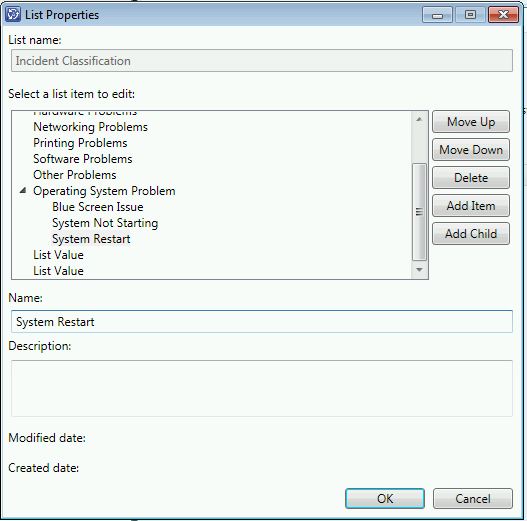
System Center Service Manager Incident Category 3


Now we are done on the server part . In order to confirm that these items have been visible to users as well . Let us log into a user system and see the user console as below :

System Center Service Manager Incident Category 4


Click on create request and you will see a window like this :

System Center Service Manager Incident Category 4


Click next and you will see that the new items have been added in the Incident box :

System Center Service Manager Incident Category 5


That's it !!


Footer Widget 1

Contact Us

Page Views

Footer Widget 3

Entertainment

Technology

Footer Widget 2

Powered by Blogger.

Translate

Social Icons

Followers

Search This Blog

Featured Posts

Random Post


© 2013 Learn IT " The Easy Way " . All rights resevered. Designed by Templateism

Back To Top